Buyer’s guide
Best IPTV for Apple TV, iPhone and iPad: players and settings
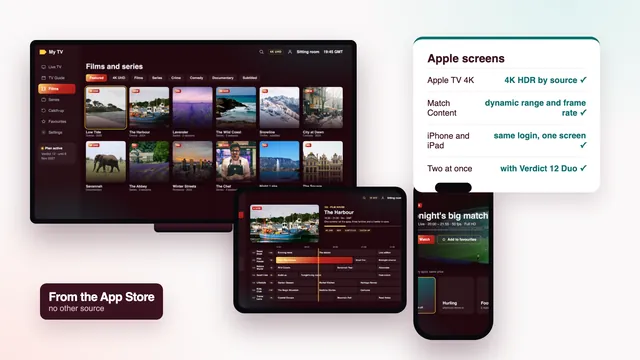
The best IPTV for Apple TV is a plan whose login opens in a player from the App Store, on an Apple TV recent enough to show the picture the source sends. Apple keeps a single store, so the choice is narrower than on Android, and the settings matter more than the app. This guide sorts out the Apple TV models, the players, the settings that make sport smooth, iPhone and iPad around the house, AirPlay to a television and the guide link in your message. Best IPTV sells IPTV plans; Apple’s devices and the player apps belong to their makers.
Four things behind the best IPTV for Apple TV
Apple TV, iPhone and iPad take their apps from a single source, the App Store. That shuts out unknown downloads, which is a good thing, and it means every player you can use has passed Apple’s own checks before reaching the store. It also means you work with what the store lists in Ireland on the day you look.
Four things settle how well a plan plays on Apple hardware:
- the Apple TV model, which sets the ceiling on resolution;
- a player that takes Xtream Codes, reads the 7-day guide and offers catch-up;
- two switches under Match Content that most owners never open;
- how many screens in the house play at once, which decides the plan.
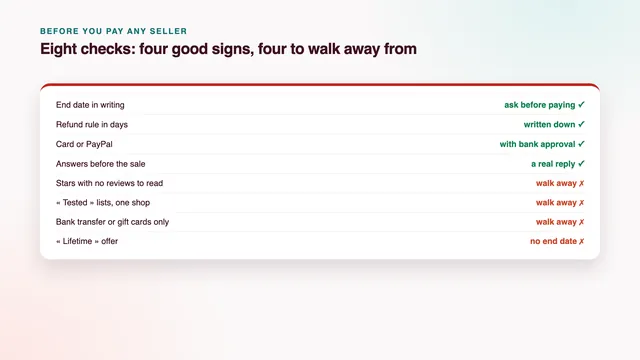
The channels and films are the same whichever device opens them. For the questions to ask any seller before paying, the home page lists the eight checks behind the best IPTV for your home.
Apple TV 4K or an older Apple TV
Your own Apple TV tells you which one it is: Settings › General › About shows the model. In broad terms there are three families.
- Apple TV 4K, sold since 2017 across three generations. It outputs 4K HDR where the source and the TV allow, decodes HEVC in hardware and runs the current players.
- Apple TV HD, from 2015, the first model with the App Store. It still runs many current players but stops at 1080p, so Full HD is the most it shows.
- Earlier models, the small black boxes from before 2015, have no App Store and cannot install a player. Some can still receive AirPlay from an iPhone, covered further down.
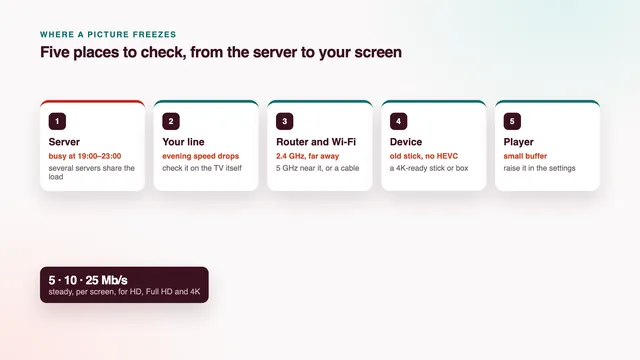
The 2022 Apple TV 4K comes in two versions. The one with more storage has an Ethernet socket; the Wi-Fi-only version does not. If the router is in another room, that matters: a cable is the steadiest way to deliver 25 Mb/s to a 4K screen, and without the socket you depend on a 5 GHz signal from a router in the same room or the next one.
For a 4K television, the best IPTV for Apple TV viewing starts with one of the 4K models. On an Apple TV HD a plan still opens every channel and film; it simply shows them in Full HD. Replacing the box pays off only if the TV is 4K and you care about the titles produced in 4K.
Players in the App Store
Search the App Store on the Apple TV itself, since some players have an iPhone version and no Apple TV version. On each store page, look for:
- an Xtream Codes login, so channels, guide, films and series all arrive from three details;
- an EPG or XMLTV field, for players that work from an M3U link;
- catch-up, shown as an archive or replay section;
- support for switching frame rate and dynamic range, so Match Content can do its job;
- the developer’s name, and whether paid extras cover iPhone, iPad and Apple TV together or each device separately.
IPTV Smarters Pro
Smarters Pro is published by Tech Smarters Private Limited and costs nothing to download. The same app covers Apple TV, the iPhone, the iPad and any Mac built on Apple silicon; an optional Premium upgrade is sold inside it, priced differently from one store to another. The app is an empty shell until you sign in: the three Xtream Codes details from your message fill it, or the M3U link does. Look-alike apps with similar names exist, so check the developer before you install.
Other players
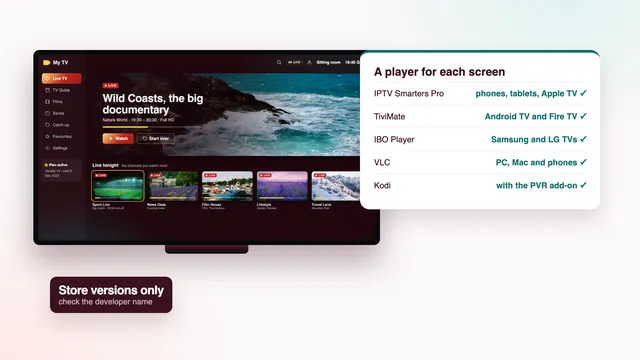
No single app makes the best IPTV for Apple TV on its own. The store lists plenty of other players: some free, some paid once, some charged by the year. Prices and features change often and we have no tie to any of them, so we do not rank them. Hold each one to the list above. VLC, free on iPhone and iPad, will play from the M3U link too, handy for seeing the channel list on a phone, though it shows no guide. The guide to player apps on every screen compares players beyond Apple.
Match Content and the settings that matter
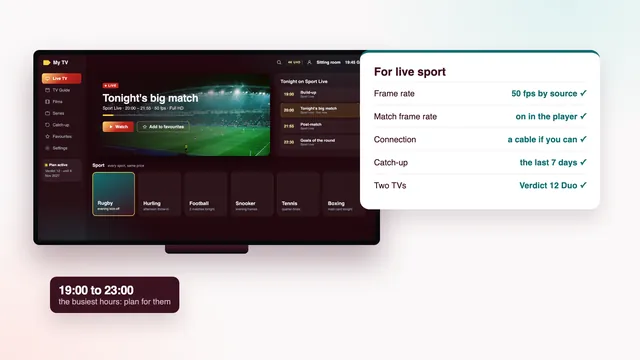
Left alone, an Apple TV sends the TV one fixed picture format all evening. Irish and European broadcasts run at 50 frames per second, while the Apple TV’s default output is often 60. The mismatch shows as a slight judder on a fast pass across a pitch.
The fix lives under Settings › Video and Audio › Match Content, with two switches worth turning on:
- Match Dynamic Range. The TV moves into HDR only when a programme was made in HDR and stays in standard range the rest of the time, so ordinary channels do not look washed out.
- Match Frame Rate. The output follows the programme: 50 frames each second on a match broadcast that way, and a film’s own rate for films.
On the same Video and Audio screen, many owners set Format to 4K SDR and leave Match Dynamic Range to step into HDR when a title calls for it. That order avoids the dull, grey look some TVs take on when they are held in HDR for every programme.
Matching only works when the player asks the Apple TV to switch. Some players do and some ignore the setting. If your TV’s signal information still reads 60 Hz during a 50 fps match, the player is not asking. HDR and Dolby Atmos depend on the title carrying them and on a TV or soundbar that can decode them.
Typing the login and loading the guide link
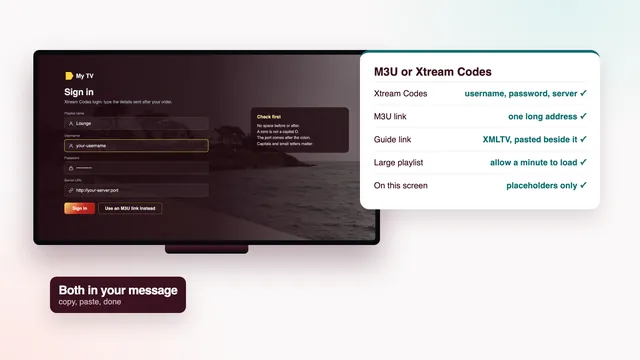
Select a field on the Apple TV and an on-screen keyboard appears. Swipe or click across it with the Siri Remote, or hand the typing to an iPhone: with a text field open on the TV, an iPhone nearby on the same Apple account will normally pop up a prompt to type there. Paste the password straight from your login message and nothing is mistyped.
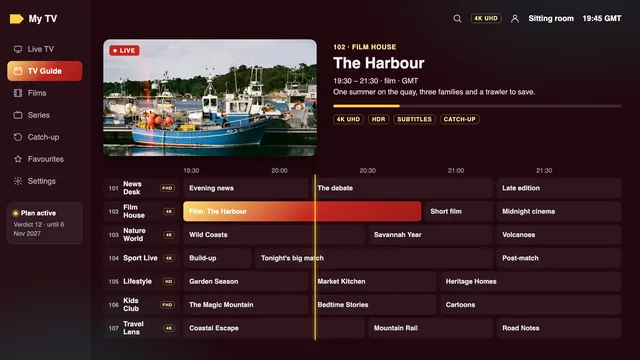
With Xtream Codes the guide arrives by itself. In a player that works from the M3U link, paste the XMLTV link from the same message into its EPG field and let the first download finish; a full week for a list this long is a heavy file.
The listings run on Irish time. Clocks here go forward to IST on the final Sunday in March and back to GMT on the final Sunday in October; as this guide was checked, on 6 November 2026, the country was on GMT. If every programme sits exactly one hour out, check the Apple TV’s time zone in its general settings, then use the player’s EPG time offset. The guide to the M3U and XMLTV links explains each line of the message in more depth.
iPhone and iPad around the house
The same player and the same login work on an iPhone or an iPad, so a match can follow you from the sitting room to the kitchen or out to the garden. Install the player, enter the three details and the channel groups appear as they do on the TV.
Count the screens, though. Verdict 3, Verdict 12 and Verdict 24 each play on one screen at a time, so on those plans the Apple TV and an iPad will not run side by side. Verdict 12 Duo, at €79 for 12 months, plays on two screens at once: the TV and a tablet, or two TVs.
Each plan belongs to one household. If a login travels beyond the home, or turns up in public, it may be suspended.
At the far end of the house a phone may fall back to a weak 2.4 GHz signal. Stay on the 5 GHz band where you can, and expect Full HD rather than 4K on a small screen, where the difference is hard to see anyway.
AirPlay from an iPhone to a TV
AirPlay sends what an iPhone or iPad plays to an Apple TV, or to a TV with AirPlay built in, which includes many recent Samsung and LG sets. It helps when a TV has no player of its own: open the channel on the phone, tap the AirPlay icon in the player and pick the TV. There are two ways to send, and they are not equal.
- The AirPlay button inside the player hands the video to the TV, usually at better quality than mirroring, while the phone turns into a handset for pausing and skipping. Some players leave this button out.
- Screen Mirroring from Control Centre copies the phone’s whole screen, with lower quality, a short delay and the phone tied up for as long as it runs.
Either way it counts as one stream on your plan, since one player is fetching it. For a TV watched every day, a player on the TV itself or on an Apple TV is steadier than a phone that leaves the room with its owner. The Samsung TV guide and the LG TV guide cover those sets' own players.
Apple devices side by side
| Device | Picture at best | Where the player comes from | Login route | Worth knowing |
|---|---|---|---|---|
| Apple TV 4K with Ethernet | 4K HDR by source | App Store on the box | Xtream Codes, typed with the Siri Remote or an iPhone | The steadiest Apple option, on a cable to the router |
| Apple TV 4K, Wi-Fi only | 4K HDR by source | App Store on the box | The same | Needs 5 GHz Wi-Fi near the router for 4K |
| Apple TV HD | Full HD | App Store on the box | The same | Every channel plays, at 1080p at most |
| Apple TV from before 2015 | None on its own | No App Store | No player on the box | Some models receive AirPlay from an iPhone |
| iPhone | Up to what the phone’s screen shows | App Store | Xtream Codes or the M3U link | Counts as a screen; can AirPlay to a TV |
| iPad | Up to what the tablet’s screen shows | App Store | Xtream Codes or the M3U link | Playing beside the TV needs Verdict 12 Duo |
| Mac with Apple silicon | Up to the display’s limit | Mac App Store | Xtream Codes in Smarters Pro | Handy for checking a login at a desk |
Whichever device you use, the catalogue does not change: the same groups, the same films and series, the same guide.
Checks that matter on Apple screens
Six scorecard checks show whether a plan is the best IPTV for Apple TV use in your home. Confirm each within the money-back window:
- Picture on your line (HD, Full HD, 4K by source): on the Apple TV’s own connection. A 4K title should show as 4K in the TV’s signal information; if it drops in the evening, look at the line first.
- Programme guide (7 days, on Irish time): seven days of listings, with the hour matching the clock on the Apple TV’s home screen.
- Catch-up (the last 7 days): find yesterday’s programme in the player’s archive. If the player has no catch-up section, that is the app, not the plan.
- Your screens (TV apps, sticks, boxes, phones): Apple TV, iPhone, iPad and Mac each take the same login, entered once per device.
- Two TVs at once (with Verdict 12 Duo): the Apple TV and an iPad playing together need Verdict 12 Duo.
- Help (24/7, WhatsApp or email): in English, including questions before you order.
The four Verdict plans differ only in months and screens. Verdict 12, the plan we suggest for most homes, costs €49 for a year, roughly 13 cent for each day of viewing. Verdict 24 at €89 gives the lowest monthly cost, €3.71, and Verdict 3 at €29 covers three months. Compare the Verdict plans and prices, or read how payment and end dates work.
For a match night, the guide to live sport adds what frame rate and catch-up mean for a game, and the guide to freezes and buffering covers the line and the router. The setup page goes from login message to first channel on each screen, and if anything on an Apple device behaves oddly, ask the team on WhatsApp or by email.
Frequently asked questions
Does an Apple TV HD work with a Verdict plan?
Yes. It runs many current players from the App Store and opens every channel and film, at up to 1080p. Only the titles produced in 4K need an Apple TV 4K to show at full resolution.
Which player should I use on Apple TV?
We do not rank player apps, and we have no tie to any of them. Smarters Pro is a common starting point because it takes Xtream Codes on every Apple device; any player that reads Xtream Codes, the XMLTV guide and catch-up will do the job.
Why does sport look slightly jerky on my Apple TV?
The Apple TV is probably sending 60 frames per second while the match runs at 50. Turn Match Frame Rate on; it sits in the Match Content screen of the Video and Audio settings. If nothing changes, the player is not asking the Apple TV to switch.
Can I watch on my iPhone while the Apple TV is playing?
Only with Verdict 12 Duo, the plan built for two screens running together. Verdict 12, Verdict 3 and Verdict 24 each allow a single screen, so one has to stop before the other starts.
Does AirPlay use a second screen on my plan?
No. AirPlay sends one stream from one player to the TV, so it counts once. Screen Mirroring is the same, though the quality is lower.
What is the best IPTV for Apple TV owners with a model from before 2015?
Those boxes have no App Store, so no player can be installed on them. Play the plan in a player on an iPhone and AirPlay it to the box if the model accepts it, or plug a stick into the TV’s HDMI socket instead.