Buyer’s guide
Best IPTV for Samsung TV: the players your set can run
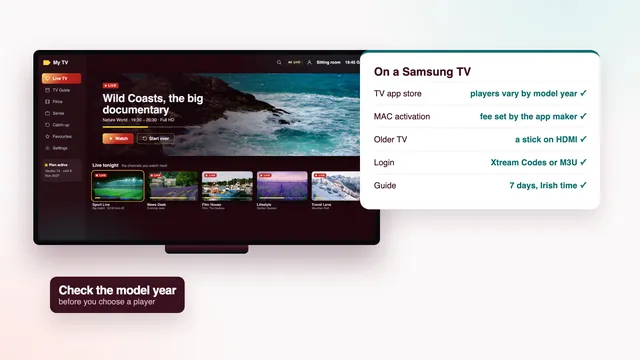
The best IPTV for Samsung TV owners is not a question of channels, since every plan carries the same list on every screen. It is a question of which player your own set can install from Samsung’s store, and how the login gets into it. This guide starts with the model year, goes through the players and their activation, and ends with the picture settings that make sport and films look right. Best IPTV sells IPTV plans; we do not make or sell any TV app, though our team will help you set one up.
Why the best IPTV for Samsung TV starts with the set
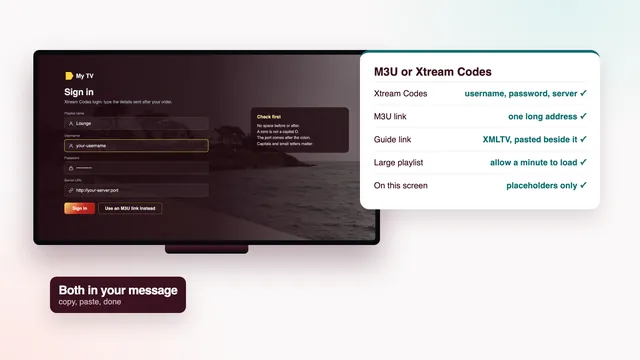
A plan is a login and nothing more: three short details (username, password, server address) plus an M3U link and a guide link, all in one message. The television has to do everything else, and on a Samsung that comes down to three things working together.
- A player in the store. Samsung sets run Tizen and install apps from Samsung’s own store only. If no suitable player is listed for your model, the TV cannot open the login on its own.
- A model recent enough. Player makers drop old sets quietly. A television from before about 2018 may list an app that no longer updates, or may not list it at all.
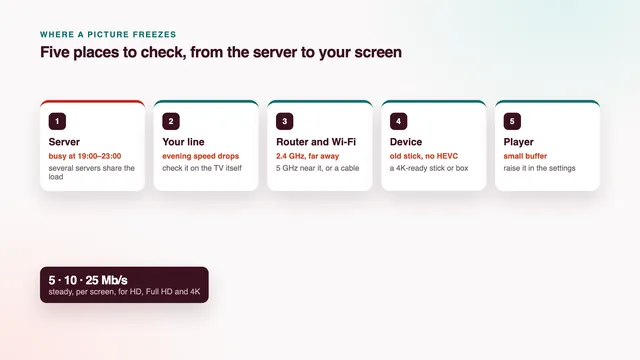
- A steady line to the set. HD wants roughly 5 Mb/s, Full HD 10 and each 4K screen 25, held steady and read on the TV itself rather than on a phone held beside the router.
None of this depends on who sells the plan, which is why an honest answer about Samsungs starts with the label on the back of the TV. For the wider question, the home page sets out the eight checks that decide the best IPTV for an Irish home, and the LG TV guide covers the other brand most homes here own.
Read the model year before you open the store
Samsung prints the model code on a label stuck to the rear panel and repeats it in the menus, usually on a support page about the TV. The code is a string of letters and digits, and one letter in it stands for the year the range came out. Type the whole code into Samsung’s support site or a search engine and the year turns up straight away.
Three groups of years behave differently:
- From about 2018 onwards: the sets most likely to list current players and keep receiving their updates. Any TV bought in the last few years sits here.
- From 2015 to about 2017: Tizen is there, but player makers may have stopped sending new versions. An app can install and then stumble on a list of 40,000+ channels, or freeze while the guide loads.
- Before 2015: an older Samsung system with a store of its own. Assume you will need a stick.
The store also follows the country the TV was set up for. A set bought abroad, or set to another country on its first start, can show a different list from the same model bought in Galway. Availability really does change by model and by country, so treat any list you read online, this one included, as a starting point and the store on your own screen as the answer.
The players in Samsung’s own app store
From the Home button, go into Apps and choose the search icon. Search by name rather than browsing: the featured rows show a few apps and hide the rest. Recent sets ask you to sign in with a Samsung account before anything downloads; older ones may first ask you to agree to the Smart Hub terms.
IPTV Smarters Pro, where it is listed
Smarters Pro, from Tech Smarters Private Limited, takes the Xtream Codes trio from your message and builds the live groups, the 7-day guide, films, series and catch-up out of them. That makes it the route with the least to type. Its listing varies with the model and with the country setting: some Samsungs show it, others do not, and its presence on phones and sticks says nothing about your TV. Check which developer the store page names, since copies with similar icons exist.
Smart IPTV and IBO Player
These two turn up on far more Samsung models, and they work another way. Neither needs the remote for the login itself. The app puts an identifier on its first screen; a web page on your phone or laptop then pairs your playlist with that identifier, and the TV collects it the next time the app opens.
Other players built on the same idea come and go in the store. Judge each one by three questions: does it take Xtream Codes or an M3U link, does it read an XMLTV guide, and does the developer named in the store match the one on its own website. The M3U guide, line by line explains what each part of your message is for.
Activation by MAC address or device key
A MAC address is a hardware identifier written as six pairs of characters separated by colons, in the form AA:BB:CC:11:22:33. Smart IPTV and IBO Player use it to know which television a playlist belongs to. IBO Player adds a device key, a second code shown under the MAC. The order of steps is the same for both:
- Install the player from Apps and open it. Note the MAC address it displays, plus the device key where there is one.
- Go to the web address printed on that same TV screen, using your phone’s browser or a laptop.
- Fill in the MAC address and any key. Into the playlist field goes the M3U link copied from your message, or the Xtream Codes details where the page has room for them.
- If the app asks for an activation, the payment is made to its maker on that same page.
- Quit the player fully on the TV and start it again. The groups load with the Irish ones first.
Smart IPTV charges a one-off activation for each television. IBO Player ties the list to the MAC address or to the key, and its maker asks for a yearly or a lifetime fee. The app maker sets those prices and can change them; we do not sell the apps, take the fee or see that payment. The plan you order from us and the app’s activation are two purchases with two dates.
Keep both dates in a note on your phone. Verdict 12, ordered on 6 November 2026, would end on 6 November 2027, the date written in your login message. A yearly app activation runs on its own calendar from the day you paid the app maker.
Finding the MAC address in the TV menus
The player normally shows the MAC on its opening screen, and that is the one to use. To confirm it in the TV’s own menus, open the settings, go to the network section and look for a status or information page; the support page about the TV often lists it as well. Menu names move between model years, but the line is always labelled MAC.
A Samsung has two of these addresses, one for the cable socket and one for Wi-Fi. On some sets the player reports whichever connection is active, so a TV moved from Wi-Fi to a cable can suddenly look like a new device. Settle the connection first, then activate. When you copy the address, bear in mind that MAC characters run from 0 to 9 and from A to F, nothing else: an O or an I in your note is really a zero or a one.
Samsung options side by side
There is no single best IPTV for Samsung TV setups. The same login works in every row below; what changes is how it reaches the screen, what you pay an app maker or a shop, and how much the set itself limits the picture. The channels, the films and the guide stay identical whichever route you take.
| Route | How the login goes in | Cost outside the plan | Picture | Suits |
|---|---|---|---|---|
| IPTV Smarters Pro from the Samsung store | Username, password and server URL typed with the remote | Free download; optional in-app extras, prices vary by store | Up to 4K, by source and by set | Sets that list it; homes that want the guide and catch-up with little fuss |
| Smart IPTV | M3U link sent from its web page against the TV’s MAC address | Paid once for each TV, at a price its maker sets | Depends on the set and the app version | Sets where Smarters is missing |
| IBO Player | Playlist linked on its web page to the MAC address or device key | Yearly or lifetime fee, set by the app maker | Depends on the set and the app version | Homes that would rather not type on the TV |
| Fire TV Stick 4K or 4K Max on HDMI | Player installed on the stick, login typed with the stick’s remote | The price of the stick | 4K HDR where the source has it | Older Samsungs, or a wider choice of players |
| Certified Android TV or Google TV box | Player from Google Play, login typed with the box’s remote | The price of the box | Up to 4K with HEVC decoded in hardware | Wired homes that want Ethernet and quick menus |
Older Samsungs and missing players: a stick or box on HDMI
When the store shows nothing usable, or the only player listed has not been updated in years, stop wrestling with the TV. On a set like that, the best IPTV for Samsung TV viewing runs through a stick, which costs less than most repairs and gives any Samsung with a free HDMI socket a full set of current players.
- Fire TV Stick 4K, 4K Max or Fire TV Cube: these show 4K HDR whenever a title carries it. Vega OS, found on some of Amazon’s newest sticks, takes apps from the Amazon Appstore alone, so confirm the model before ordering. The Firestick guide to models and players sorts out which is which.
- An Android TV or Google TV box with the certification, which brings Google Play and regular security fixes. The box buying guide lists the specs worth paying for and the ones to ignore.
Three Samsung settings make the added device behave like part of the TV:
- Anynet+ (HDMI-CEC), in the general or external device settings. The Samsung remote can then move through the stick’s menus, and the TV wakes when the stick does.
- Input Signal Plus (HDMI UHD Colour on older sets), switched on for the socket the stick uses. Without it, many Samsungs hold that socket below the full 4K HDR signal.
- Power from the wall. Plug the stick’s adapter into a mains socket rather than the TV’s USB port, which may not supply enough current and goes dead whenever the screen is off.
Picture settings worth changing for sport and films
Most Samsungs leave the factory in a bright mode designed for a shop floor. Two minutes in the picture menu does more for a match or a film than any upgrade to the line. Names shift between model years, so look for the closest match.
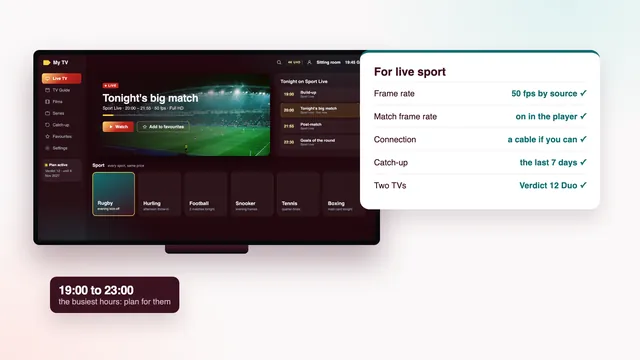
For live sport
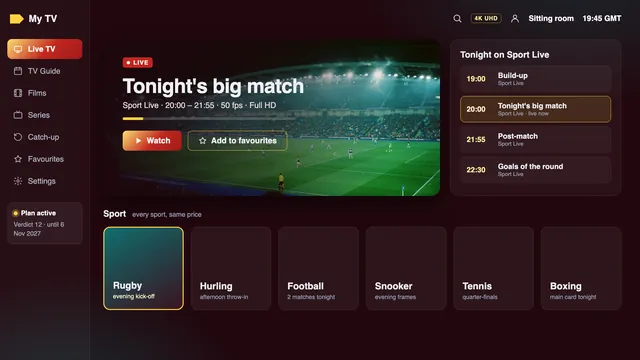
- Picture mode: Standard for afternoon matches. Dynamic looks vivid in a showroom and tiring after an hour at home.
- Motion: Picture Clarity on recent sets, Auto Motion Plus on older ones, set to Auto or a low custom level. It keeps a fast ball sharp; pushed high, it can draw halos around the players.
- Game Mode off. It strips out the motion processing that helps a hurling or rugby match, in exchange for a speed only consoles need.
For films and series
- Picture mode: Movie, or Filmmaker Mode where the set has it. Colours look warmer at first; give your eyes an evening before you judge.
- Motion smoothing off, or at its lowest level, so a film keeps its natural look instead of a flat, video-like sheen.
- Energy saving: if dark scenes turn murky, switch off the option that dims the screen to suit the light in the room.
- HDR and Dolby Atmos switch on by themselves, but they need a source that carries them, plus a player and a TV able to handle them.
The scorecard checks that matter on a Samsung
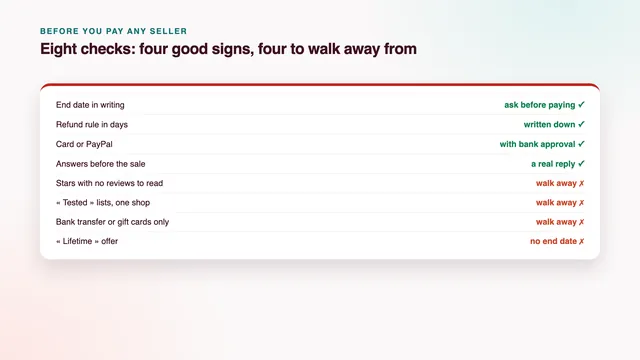
The scorecard on the home page lists eight checks. Five of them tell you whether you have found the best IPTV for Samsung TV use in your own sitting room. Run each at home within the 7-day money-back window:
- Picture on your line (HD, Full HD, 4K by source): on the TV’s own Wi-Fi or cable. A 4K title that stalls at nine in the evening is a question about the line before it is a question about the plan.
- Programme guide (7 days, on Irish time): open the guide in the player and see whether tonight’s listings line up with the clock. If they sit exactly one hour out, the EPG time offset in the player’s settings puts them right.
- Your screens (TV apps, sticks, boxes, phones): confirm the player is current on your model year, or that the stick is plugged in and set up.
- Two TVs at once (with Verdict 12 Duo): if a second TV upstairs will play at the same moment, Verdict 12 Duo is the plan for it.
- Money back (7 days if nothing plays): it applies if the login never turns up, or if no screen shows a picture even after our team has helped.
All four Verdict plans carry the same channels, films and picture quality; only the months and the screens differ. Our pick for most homes is Verdict 12: €49 paid once for a year, so €4.08 monthly and 13 cent daily. For a Samsung and a second set running together there is Verdict 12 Duo (€79); Verdict 24 (€89) spreads the cost thinnest, €3.71 monthly; Verdict 3 (€29) covers three months. Compare the four Verdict plans and their prices, or read how each Verdict plan is paid and when it ends.
Once the login message lands, the setup page, screen by screen takes you to the first channel. If your model is old, or the store looks nothing like this page, send us the model code before you order. We will tell you plainly whether the TV alone will do or whether a stick is the better buy.
Frequently asked questions
Is IPTV Smarters Pro in the Samsung app store?
That varies with the model, and with the country chosen when the TV was set up. Search Apps by name on your own set. Where Smarters is absent, IBO Player or Smart IPTV usually appear, and a stick on HDMI opens Smarters and many other players whatever the TV’s age.
Do I pay the Smart IPTV or IBO Player activation to Best IPTV?
No. The app maker sets and collects that fee on its own web page, and we neither sell the apps nor see the payment. Your Verdict plan is paid separately, through the secure link our team sends after you order.
My Samsung is from 2016. Will it work?
It may, but plan for the chance that it will not. Sets from 2015 to 2017 often list players at older versions that struggle with a large channel list. If the app is missing or freezes, a stick on HDMI costs far less than a new TV.
Why does the player say my TV is a new device?
On some Samsungs the app reports the MAC address of whichever connection is in use. If the TV moved from Wi-Fi to a cable, or the other way, the address changed. Go back to the connection you activated on, or ask the app maker about moving the activation.
What is the best IPTV for Samsung TV owners who hate typing with a remote?
A plan loaded into IBO Player or Smart IPTV, since both take the playlist from a web page on your phone rather than from the remote. The trade-off is the app maker’s activation fee and menus that vary from one version to the next.