Buyer’s guide
Best IPTV for sport: smooth, close-to-live matches at home
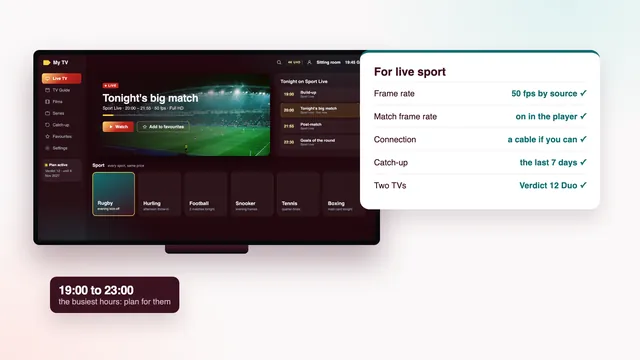
The best IPTV for sport is the plan, player and connection that keep a fast match smooth, close to live and easy to find, on the very evening when everyone else is streaming too. Most of that is settled in your own home: the frame rate the player sends to the TV, the cable or Wi-Fi behind it, and the hour you watch. This guide covers each part, from 50 fps to two TVs on a big day, then lists the settings worth changing on every common device.
What the best IPTV for sport gets right
A film forgives a lot: 24 frames a second, a slow camera, a long buffer. Live sport has none of that cover. A sliotar crosses the screen in a fraction of a second, the camera swings to follow it, and half the country is watching at the same moment.
| What matters | Film night | Live sport |
|---|---|---|
| Frames per second | 24 or 25 is normal | 50 where the source allows it |
| Delay behind the broadcast | Irrelevant | Matters once a phone alert or a neighbour gets there first |
| Player buffer | A large one costs nothing | A trade-off between fewer stalls and a longer delay |
| When you watch | Whenever suits you | A fixed start, often in the busiest hours |
| If you miss it | Still in the library | Catch-up on channels that offer it, for a few days |
Frame rate: 50 fps when the source allows it
Television in Ireland and the UK is built around 50 pictures a second. Sport is normally filmed and broadcast at that rate, and when a stream keeps all 50, a long pass or a horse coming round the turn stays fluid. Some sources halve it to 25 to save bandwidth; on a studio programme you would never notice, but on a fast pan the picture steps instead of gliding.
On Best IPTV plans, live sport plays at 50 frames a second wherever the source provides it. The rate belongs to each channel’s source and no setting can add it later, so the best IPTV for sport starts with asking the seller about it and then looking for yourself in the first week.
Where 50 fps shows most
The gain is clearest where a small, fast object is followed by a moving camera: hurling, tennis, football, rugby, and cricket as the ball is bowled. Horse racing and motor racing benefit on long tracking shots. Darts, snooker and golf on the green move slowly enough that 25 frames rarely bothers anyone.
How to see what you are getting
Most player apps show stream details during playback: open the information panel and find the frame rate next to the resolution. In VLC on a computer, the codec information window gives the same figure. Look at a sport channel during a live event, not a news channel, because the source is what you are judging.
Let the player match the frame rate
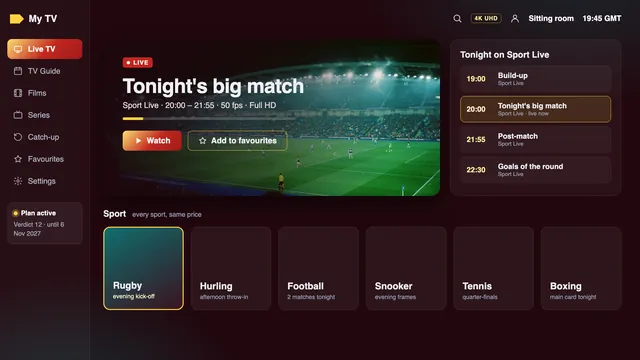
Many sticks and boxes send 60 Hz to the TV by default, which suits material made for North America. A 50 fps match squeezed into 60 Hz cannot be shown evenly: some frames linger longer than others, and every pan picks up a regular judder that looks like a fault in the stream. Frame-rate matching cures it by moving the TV to 50 Hz when a 50 fps stream starts, and back afterwards. Expect a blank second or two as the TV changes mode; that pause means it works.
- Apple TV: Match Frame Rate sits inside Match Content, reached from Settings through Video and Audio. Switch it on, along with Match Dynamic Range, so HDR is used only for programmes made in HDR.
- Fire TV: on recent models, the Display menu under Display & Sounds has a Match Original Frame Rate option. Some players add a frame-rate switch of their own.
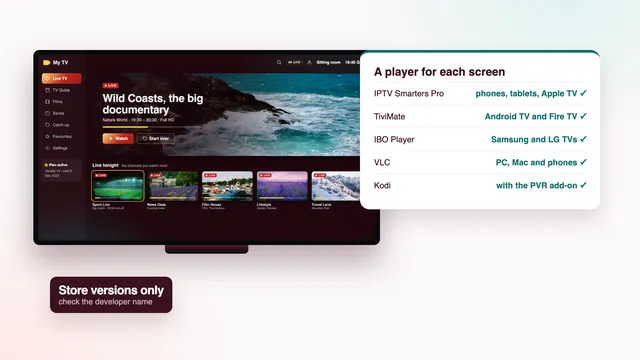
- Android TV and Google TV: newer versions offer frame-rate matching in the advanced display settings; on older ones, use the player’s auto frame rate option, which players such as TiviMate include.
- Kodi: in the player settings, under Videos, set Adjust display refresh rate to change on start and stop.
- Samsung and LG TVs: the TV’s own apps usually play 50 fps without a switch; look at motion smoothing instead, in the table at the end.
How far behind live you will be
Every live stream trails the broadcast it comes from. The gap runs from a few seconds at best to roughly thirty at worst, because the picture is encoded, carried across the internet, then parked briefly in the player’s buffer. That is normal; what you can control is how much it grows during a match.
- Mute score alerts on your phone until the final whistle, and stay away from live text and group chats.
- Reopen the channel after a freeze. Some players carry on from the frame where the picture stopped, which leaves you further behind; leaving the channel and coming straight back jumps to the live point.
- Keep the buffer moderate. Where a player offers a buffer size, a larger one rides out a brief dip on the line but adds seconds of delay. A middle setting suits most homes.
A wired TV and the evening peak
Wire the TV that shows the match
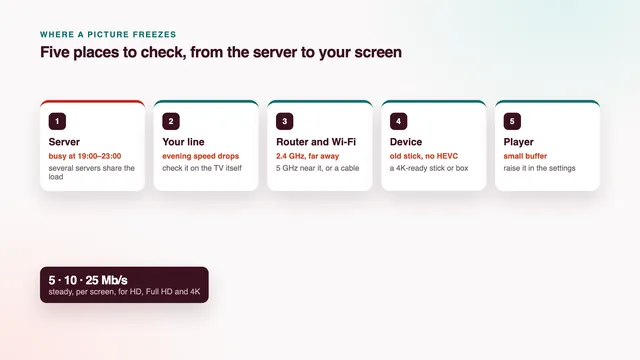
Most stutters start on the home side, and a weak Wi-Fi signal is the usual suspect: in the evening every phone, tablet and console in the house wants the same airwaves. Running a cable between the router and the TV, stick or box removes that whole problem in one step.
If the router sits in the hall and the TV in the sitting room, a long, flat Ethernet lead tacked along the skirting costs little; powerline adapters come next. Most sticks lack an Ethernet port, but USB adapters made for them exist. Without a cable, keep to 5 GHz and to the room the router is in, or the next one.
Budget roughly 10 Mb/s for a Full HD match and 25 Mb/s per 4K screen, and take the reading on the TV or stick, not your phone: what counts is the figure the TV gets at kick-off time. Our guide to stopping buffering goes further into the line, the router and the player’s buffer.
When the whole country is watching
The load is heaviest between about 19:00 and 23:00, and heavier again on Saturday and Sunday evenings and the nights of big matches. That is also when your own home is busiest online and, on a 4G or 5G home router, when the local mast is carrying everyone else’s evening too.
On our side, Best IPTV spreads the evening load over several servers. No seller can honestly promise a stream that never freezes, and the best IPTV for sport is not one that claims to. What you can do is strengthen the home side before the start:
- Start the channel ten minutes before the throw-in or kick-off, so any problem shows itself early.
- Pause big downloads in the house: console updates, cloud photo backups, a film saving to a laptop.
- If a 4K stream stalls, move to the Full HD version of the channel; a smooth picture at 50 fps beats a sharper one that stops.
Your 7-day money-back window always contains a weekend, so watch something live, wired, on a Saturday evening within it. The rule covers a login that never turns up, or a picture that never appears on any screen after our help; a line too slow for 4K is not covered, so measure first.
The guide and catch-up for matches you missed
Irish fixtures tend to bunch on weekend afternoons, with Gaelic football, hurling, rugby and football often overlapping. Open the 7-day guide in the morning, find the channels carrying the games you want, and add them to a favourites group so they sit together.
Listings follow Irish time, and the clocks change on the final Sunday in March and the final Sunday in October. At the date of this check (6 November 2026) Ireland is on GMT. If every listing is exactly one hour out after a change, adjust the EPG time offset in the player by one hour instead of reloading the guide.
Catch-up, for the match you could not watch live
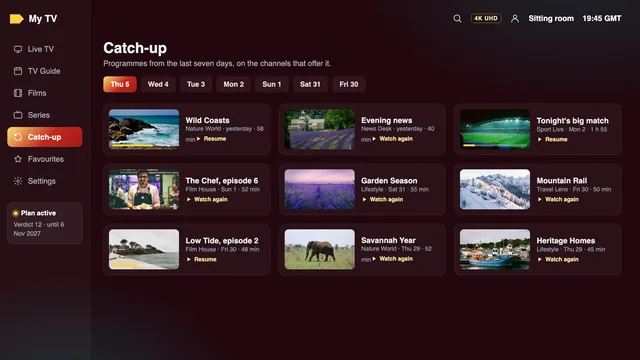
On channels that offer it, catch-up keeps programmes for a number of days, usually up to seven. A small rewind or clock symbol marks those channels in most players; scroll the guide back to the day and time of the game and play it from the start.
It suits sport played far from Irish time, such as cricket and golf from the other side of the world, or boxing that starts in the small hours. To keep the result a surprise, reach the match through the guide rather than a news app.
Two TVs on a big day
Some days the house splits. A hurling match and a rugby game start within half an hour of each other, or the racing is on in the kitchen while football plays in the sitting room.
Verdict 3, Verdict 12 and Verdict 24 are one-screen plans. Verdict 12 Duo runs two screens together for twelve months at €79, which is €6.58 a month against €4.08 for Verdict 12; offers seen online ask about €100–130 for two screens over a year at the time of writing. Both sit side by side in the four Verdict plans, and the plans page with end dates shows when each one finishes.
Each TV needs its own player app with the same login typed in, and both TVs must be in the same home: a login passed to another household or posted online can be suspended. Two streams also mean twice the bandwidth, about 20 Mb/s for two Full HD games and around 50 Mb/s for two in 4K, so wire at least the TV showing the bigger game.

Settings per device for live sport
Menu names change with the model and software version, so read these as where to look, on recent models at the time of writing. Getting them right matters more to the best IPTV for sport than any channel count.
| Device | Frame rate | Picture and motion | Connection |
|---|---|---|---|
| Apple TV 4K | Match Frame Rate: on (under Match Content) | Dynamic range matching: on | Ethernet on models with a socket, else 5 GHz Wi-Fi |
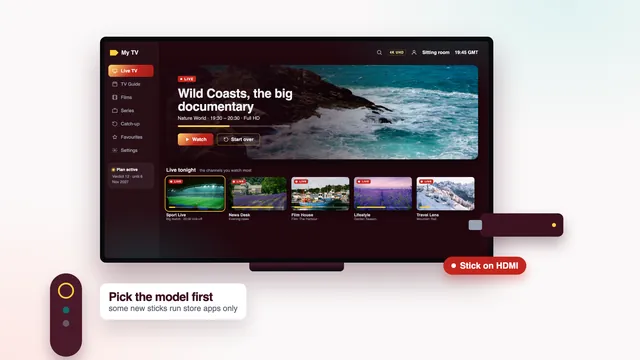
| Fire TV Stick 4K, 4K Max, Cube | Match Original Frame Rate: on, where offered | Lite and older basic sticks max out at Full HD, still fine for 50 fps | Ethernet port on the current Cube; an adapter or 5 GHz Wi-Fi on a stick |
| Google TV or Android TV box | Match content frame rate (display settings) or the player’s auto frame rate | Hardware decoding on in the player; buffer at a middle setting | Ethernet if the box has a socket |
| Samsung TV | The TV’s own apps follow the source | Picture Clarity, or Auto Motion Plus on earlier models: off or low if the ball trails a halo | Ethernet socket on the back of most sets |
| LG TV | The TV’s own apps follow the source | TruMotion off or low, for the same reason | Ethernet socket on the back of most sets |
| Kodi with PVR IPTV Simple Client | Adjust display refresh rate: on start and stop | Hardware acceleration allowed in the player settings | Ethernet where you can |
| VLC on a PC or Mac | Follows the computer’s display | Hardware-accelerated decoding on; more network caching if it stalls | Ethernet |
| Phone or tablet | Adapts on its own | Do Not Disturb on, to keep score alerts off the screen | 5 GHz Wi-Fi near the router; mobile data counts against your allowance |
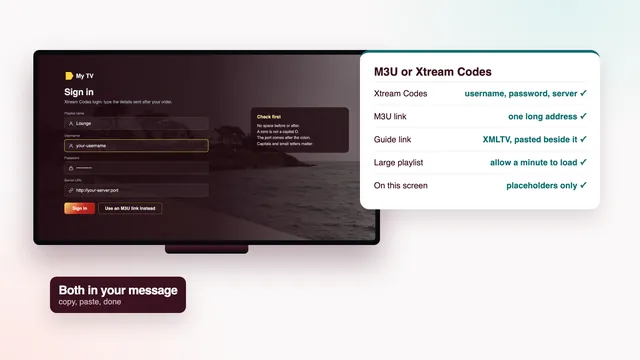
Typing the login into each of these is covered in the setup guide; for a stick or an Apple box, see the Firestick guide and the guide for Apple TV and iPhone.
The scorecard checks that decide a match night
- Check 1, picture on your line: HD, Full HD, 4K by source, plus 50 frames a second for live matches, source permitting.
- Check 2, programme guide: 7 days, on Irish time, so start times read correctly.
- Check 3, catch-up: the last 7 days, on the channels that offer it.
- Check 6, two TVs at once: with Verdict 12 Duo, for the days the house splits.
- Check 8, help: 24/7, WhatsApp or email, a Saturday evening included.
The other three checks, and how to put all eight to any seller, are in the guide to judging a seller. The full scorecard, and what the best IPTV for your home should pass, are on our home page. If a setting is not where this table says, ask the team with your TV’s model name.
Frequently asked questions
What is the best IPTV for sport on a big TV?
One whose source keeps 50 frames a second, played through a player that switches the TV to 50 Hz, on a wired connection. Picture size matters less than motion: a smooth Full HD match looks better on a large screen than a 4K one that judders or stalls.
Why is my stream behind the score on my phone?
A live stream always trails the broadcast a little, often by several seconds and sometimes by close to half a minute. After a freeze some players resume where they stopped, which adds more; leave the channel and reopen it to return to the live point.
Is 4K worth it for sport?
For a match made in 4K, yes, provided the line keeps about 25 Mb/s free for that screen at peak time, the TV or device is 4K on an HDMI 2.0 port or later, and the player decodes HEVC with hardware. Otherwise a steady Full HD picture at 50 fps is the better choice.
Can two people watch different matches in different rooms?
Yes: Verdict 12 Duo runs two screens together for twelve months at €79. The other three plans play on a single screen, and both TVs must be in the same household.
Why does the picture freeze just as a big match starts?
It is the busiest moment of the evening, both in your home and on the servers. Start the channel ten minutes early, wire the TV and pause downloads in the house. If it keeps happening, send the team your TV model and the time.
How do I watch a match I missed?
Scroll the guide back to when it was played and start it from the beginning, on a channel with catch-up, which normally reaches back as far as a week. Not every channel keeps catch-up, so look for the symbol on the ones you follow.
Which sports will I find?
Channels are sorted by country and then by category, with Irish groups first, sport among them, followed by UK groups and a separate sport section. Each channel follows its own schedule, so we promise no particular fixture; check the guide for the sports you follow, whether that is hurling, darts or motor racing.